In today's fast-paced digital world, data integration has become crucial for businesses to stay competitive. Organizations need to efficiently connect, ingest, and process data from various sources to derive meaningful insights and make informed decisions.
Matillion, a powerful data integration and transformation platform, offers seamless connectivity and data ingestion capabilities through its support for APIs.
In this article, we will explore how you can harness the power of APIs in Matillion to create your own Custom Components and leverage its inbuilt Connectors for a streamlined data integration experience.
The Fuel for Efficient Data Integration
APIs (Application Programming Interfaces) serve as the backbone of modern applications and systems and Data Ingestion in Data Engineering World. They enable seamless communication and data exchange between different software components, allowing businesses to integrate diverse systems and leverage valuable data sources. Connectivity and data ingestion from APIs are essential for businesses to access real-time information, synchronize data across platforms, and enable automation.
Enhancing Data Integration with Matillion's Inbuilt Connectors
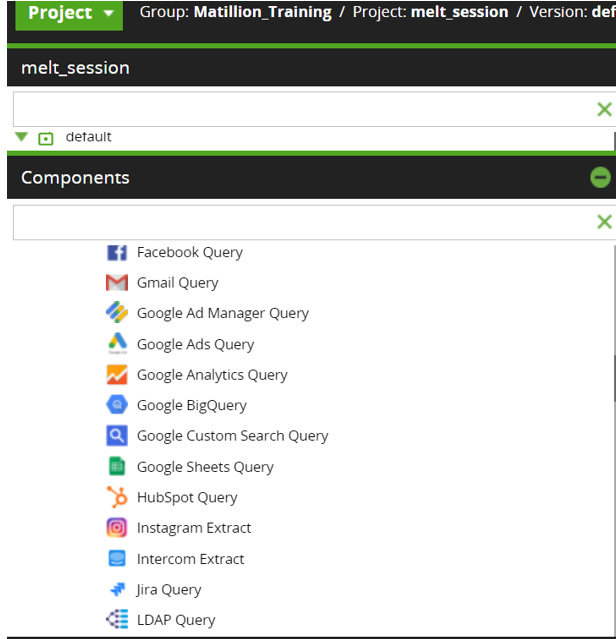
Matillion offers a wide range of inbuilt connectors that enable users to easily connect and ingest data from APIs.
These connectors streamline the integration process by providing pre-configured settings and authentication options. With just a few clicks, users can establish secure connections to popular APIs, such as Salesforce, Google Analytics, and Amazon Web Services, YouTube, Facebook, LinkedIn, among others.
These inbuilt connectors eliminate the need for complex coding or manual configuration, making data ingestion from APIs a seamless and efficient process. Matillion's intuitive user interface allows users to effortlessly set up the required connections, specify data retrieval parameters, and schedule automated data ingestion jobs.
With the help of these inbuilt connectors, businesses can leverage the power of various APIs and integrate data from multiple sources without any hassle.
Whether it is pulling customer data from a CRM system, analysing website traffic metrics, or extracting information from cloud storage services, Matillion's inbuilt connectors simplify the data ingestion process and ensure that the data is readily available for further processing and analysis.
Creating Custom Components in Matillion for Advanced Data Integration
While Matillion's inbuilt connectors cover a wide range of APIs, there may be instances where a custom API integration is required. Matillion addresses this need by allowing users to create their own custom components. And That is Amazing and particularly useful in real time scenarios.
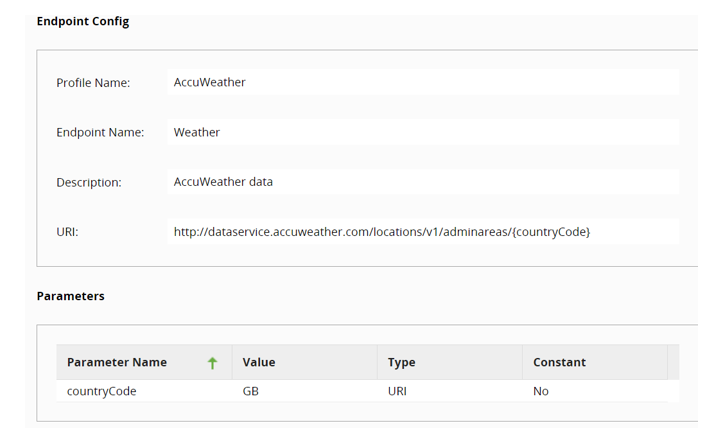
Creating a custom component in Matillion involves defining the required inputs, outputs, and functionalities for interacting with a specific API with API URI Address, Authorization details, parameters etc.
Users can leverage Matillion's comprehensive API documentation and development tools to build a custom component tailored to their specific integration requirements.
The ability to create custom components opens endless possibilities for data integration in Matillion. You can connect to any API, regardless of whether it has an inbuilt connector or not.
This flexibility empowers businesses to integrate data from niche or proprietary systems, ensuring that no valuable data source is left untapped.
By combining the power of inbuilt connectors and custom components, Matillion provides users with a comprehensive toolkit for seamless data integration.
Whether it is utilizing pre-configured connectors or building custom components, Matillion ensures that businesses can effortlessly connect to APIs and ingest data for driving actionable insights.
A Step-by-Step Guide to Creating Custom Components in Matillion:
Identifying the Integration Points
To create a custom component in Matillion, the first step is to identify the integration points a.k.a. API URI and Authorization within your data integration workflow.
Matillion provides a visual interface that allows users to easily identify these points and define the required inputs and outputs for their custom components, below is the image of same:
Defining the API Interaction and Building the Custom Component
Once the endpoints points have been identified, the next step is to define the interactions with the API. This involves understanding the API documentation provided by the external service or application and determining the appropriate API calls, parameters, and authentication methods to be used.
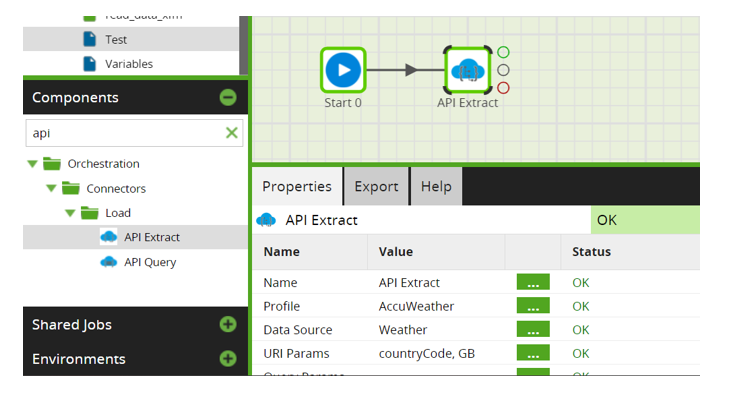
Matillion offers API Components where you use the custom connector made earlier. This simplifies the process of interacting with various APIs, making it easier for users to incorporate external data sources into their data integration workflows and bring the data in as either JSON/XML or Flatten it as it comes into tabular data:
This involves configuring the necessary inputs and outputs, mapping the data transformations and logic, and configuring any additional settings required for the API calls and get the data ingested.
Matillion provides a powerful and intuitive development environment that enables users to visually design their custom components without the need for complex coding or scripting.
Testing and Iterating
Once the custom component has been built, it is essential to thoroughly test its functionality and ensure that it integrates seamlessly with the rest of the data integration workflow.
This iterative testing process where you use the API connector made (AccuWeather in our case) enables users to identify and rectify any issues or errors, ensuring the reliability and accuracy of their data integration processes and load data as per business rules.
Matillion's Inbuilt Connectors and Custom API connector Use Cases:
1. Google Ads API, Issues, Workarounds, and Solutions
An Interesting use case we faced while working for Ad Council . While exploring the process of retrieving data from Google Ads through the integration of Matillion with Python.
Recently, Google introduced a revamped schema for Google Ads, deprecating the previous schema in mid 2022. In response, Matillion developed a new component specifically designed for Google Ads Kudos. However, this change introduced a requirement for the Google Ads Query Language (GAQL), which was not supported by Matillion's component at the time.
To overcome this limitation, a solution was devised that involves few Python components. The first Python component is responsible for acquiring the refresh token for API Authorization. The second component retrieves a list of Customer IDs associated with the Manager Account, along with their respective Campaigns and Campaign IDs.
The last Python components serve to establish a connection and facilitate data extraction using the GAQL query format. By passing the Customer ID as a grid variable through an iterative process, data can be efficiently extracted.
The extracted data can then be transferred to the cloud, where Matillion is hosted, in various formats such as Excel (.xlsx), XML. Depending on the format, an Excel query component or S3/Azure Blob Storage integration can be utilized.
2. Three Diverse Approaches to Data Ingestion from API via Utilizing a cURL Command:
Utilizing a basic cURL command from a Large Healthcare Management client, comprising API token, parameters, and URI, in three distinct data ingestion methods:
· Initial testing via Matillion's Bash Script Component to establish API connection and validate with a success code (200).
· Developing a Matillion Python Script Component to extract test data for analysis.
· Transformation into a Custom API Connector for daily retrieval of refreshed batch data, with potential for real-time streaming scenarios.
To Summarize, Matillion offers a robust platform that empowers users to harness the power of APIs by creating custom components and leveraging its inbuilt connectors.
By following the above step-by-step guide to creating custom components and leveraging Matillion's inbuilt connectors, businesses can unlock the full potential of data integration and drive informed decision-making.
Embrace the power of APIs in Matillion and revolutionize your data integration practices today.